
|
EZTag CE - Sky Plot View |

|
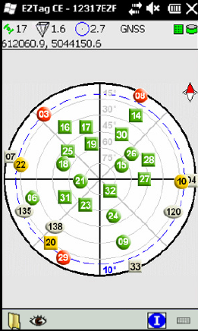
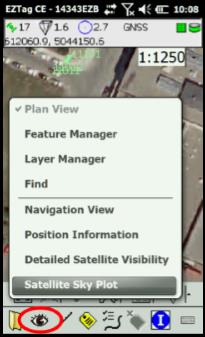
The Satellite Sky Plot is available through EZTag CE View menu. The sky plot is based on the latest GNSS almanac available in the receiver. It displays a graphical view of the position of the GNSS satellites in the sky.
The shapes represents the satellite constellation: ■ Circle: a GPS satellite; ■ Square: a GLONASS satellite; ■ Ellipse: a SBAS satellite.
The colors represents the satellite status: ■ Green: above the mask angle and used to compute the solution; ■ Red: below the mask angle or not used to compute the solution; ■ Yellow: 5° above the mask angle and used to compute the solution; ■ Grey : inactive, unusable or not visible. |
|
The dotted blue line and the angle written in blue |

|
Article: 000069 Related Products: EZTag CE Last Update: 2017-04-04 21:21:03 |
|
Document information |

|
|